• Skip to main content
  • Skip to primary sidebar

Reefwing Software

  • Home
  • Copy Editor
  • iOS Apps
  • Blog
  • Contact Us
  • Privacy
You are here: Home / Archives for Marketing

Marketing

February 1, 2024 by David Such Leave a Comment

Maximising Medium Earnings by Looking at your Statistics

We were recently commiserating with another author about how difficult it was to extract meaningful actions from the current crop of Medium story statistics. We have tripled our publication rate, but unfortunately, revenue has not followed suite.

Our analysis had previously consisted of a cursory glance over the story stats and comparing the month on month income. However, if we were going to criticize the analytics provided by Medium, we should at least have a proper look at them.

Read More – https://medium.com/@reefwing/maximising-medium-earnings-by-looking-at-your-statistics-ce5e75e2d130

Filed Under: AI, App Development, Marketing

November 19, 2022 by David Such Leave a Comment

An Arduino Nano Electronic Speed Controller (ESC) — Part 3

In Part 1 we introduced our Arduino based ESC and followed this in Part 2 with an explanation of the power stage and MOSFET drivers. Part 3 focusses on the bootstrap capacitor which is part of the driver circuit used to turn the high-side MOSFET hard on. #arduino #bldcmotor #esc #bootstrapcapacitor #IR2110

https://reefwing.medium.com/an-arduino-nano-electronic-speed-controller-esc-part-3-e17392bd2887

Filed Under: App Development, Drones, Embedded, Marketing

October 27, 2020 by David Such Leave a Comment

MineSweeper HD reviewed by GameKeys

Our MineSweeper HD game was relecently reviewed by GameKeys in their article on Underrated Simulation Games To Play on IOS.

Head over to the GameKeys site to see what they had to say about it.

Filed Under: App Development, Marketing

June 29, 2018 by David Such Leave a Comment

How to make a game like Flappy Bird in Swift


I just published my first video game tutorial on #skillshare – “How to make a game like Flappy Bird in Swift.” Check it out!

This was a lot harder than I was expecting – it took me 3 days to shoot 3 minutes of video, do the voice overs and edit in After Effects. I think I’m now ready to shoot a feature film!

Filed Under: App Development, iOS, Marketing

January 21, 2018 by David Such 4 Comments

Visual Aircraft Forecasts – NEW iOS App from Reefwing Software

Sick of trying to decode unintelligible aviation weather information? If so you need our new app!

You can view a preview of the app in use.

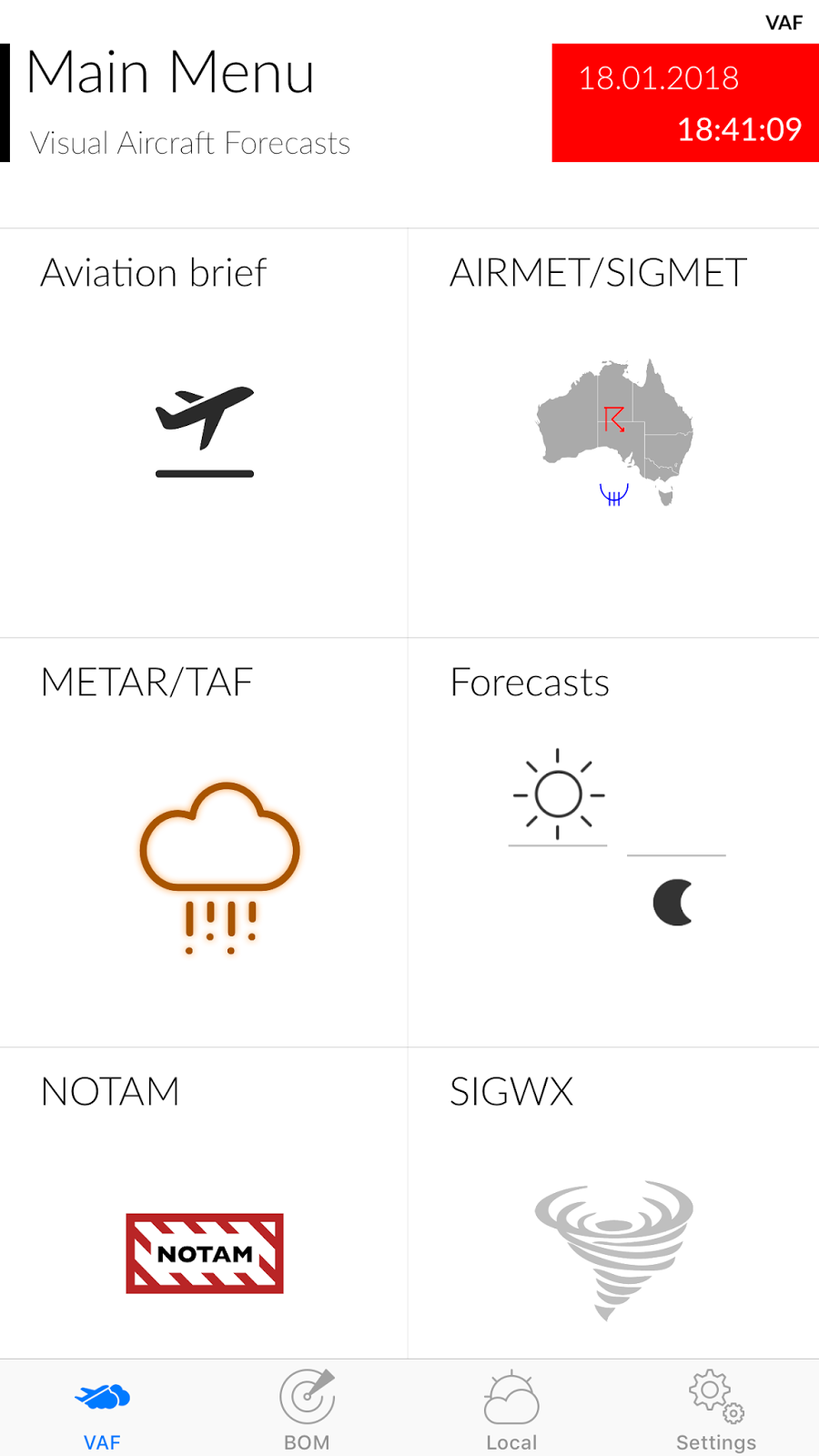
Visual Aircraft Forecasts (VAF) for Australia reduces the complexity of aviation weather forecasting by providing graphical representations of the weather data provided by the various authorities.

Visual Aircraft Forecasts for Australia aggregates data from the Australian Bureau of Meteorology (BOM), National Oceanic and Atmospheric Administration (NOAA), International Civil Aviation Organization (ICAO) and the Open Weather Map organisation.


The VAF tab focusses on aviation specific information and includes:

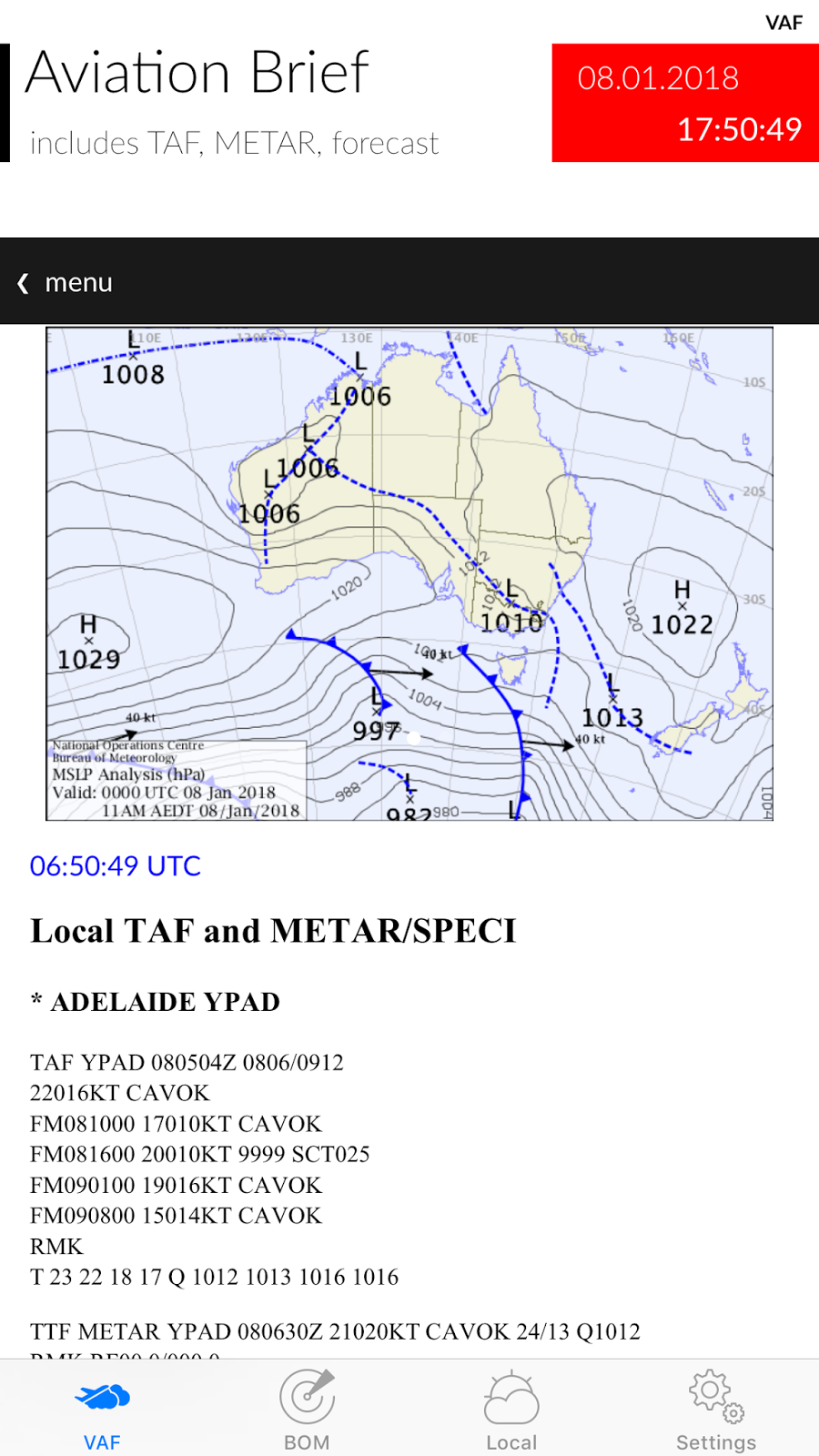
a) Aviation Briefs which are available for 10 regions in Australia. It is derived from the Aviation Weather Packages on the BOM web site.


b) AIRMET/SIGMET – The latest graphical and text based versions are provided (from the BOM). You can use two fingers to zoom in and out of the PDF’s on this screen.

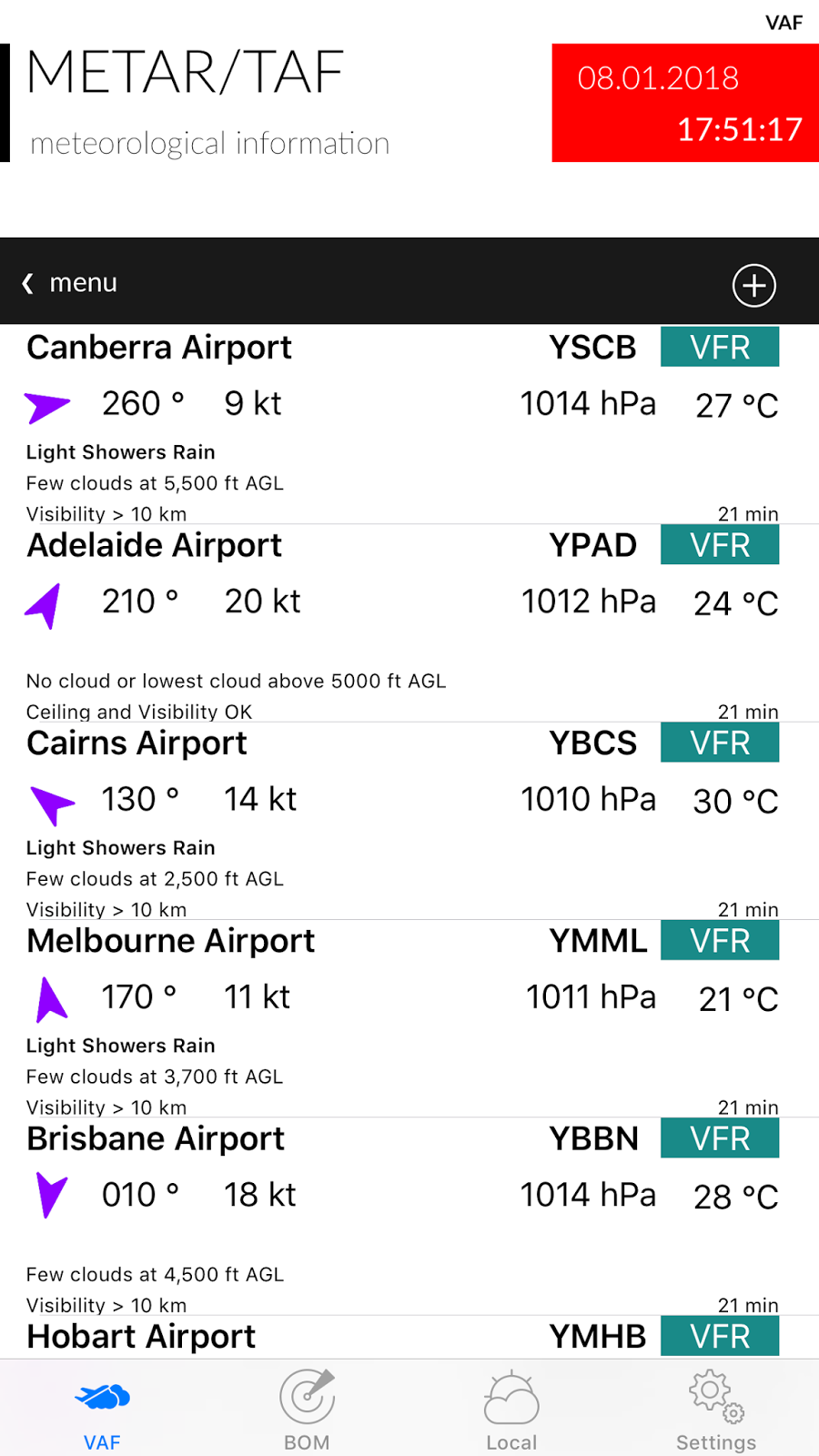
c) METAR/TAF – Are decoded for a selected list of airports. Display includes wind direction and speed, cloud cover, visibility, temperature and QNH. You can add additional airports using the + button (top right). To delete an airport, swipe left. In the Settings Tab you can select whether this data comes from BOM or NOAA (default is BOM). You get slightly different data depending on the source, but there are a lot more sites using BOM. Only the major airports are on NOAA but you also get Lat, Long, Elevation and Altimeter. Tap on a METAR to bring up the detailed version and to view the raw data.


d) Forecasts – these are the new Graphical Area Forecasts from BOM. You can use two fingers to zoom in and out on this screen as well.

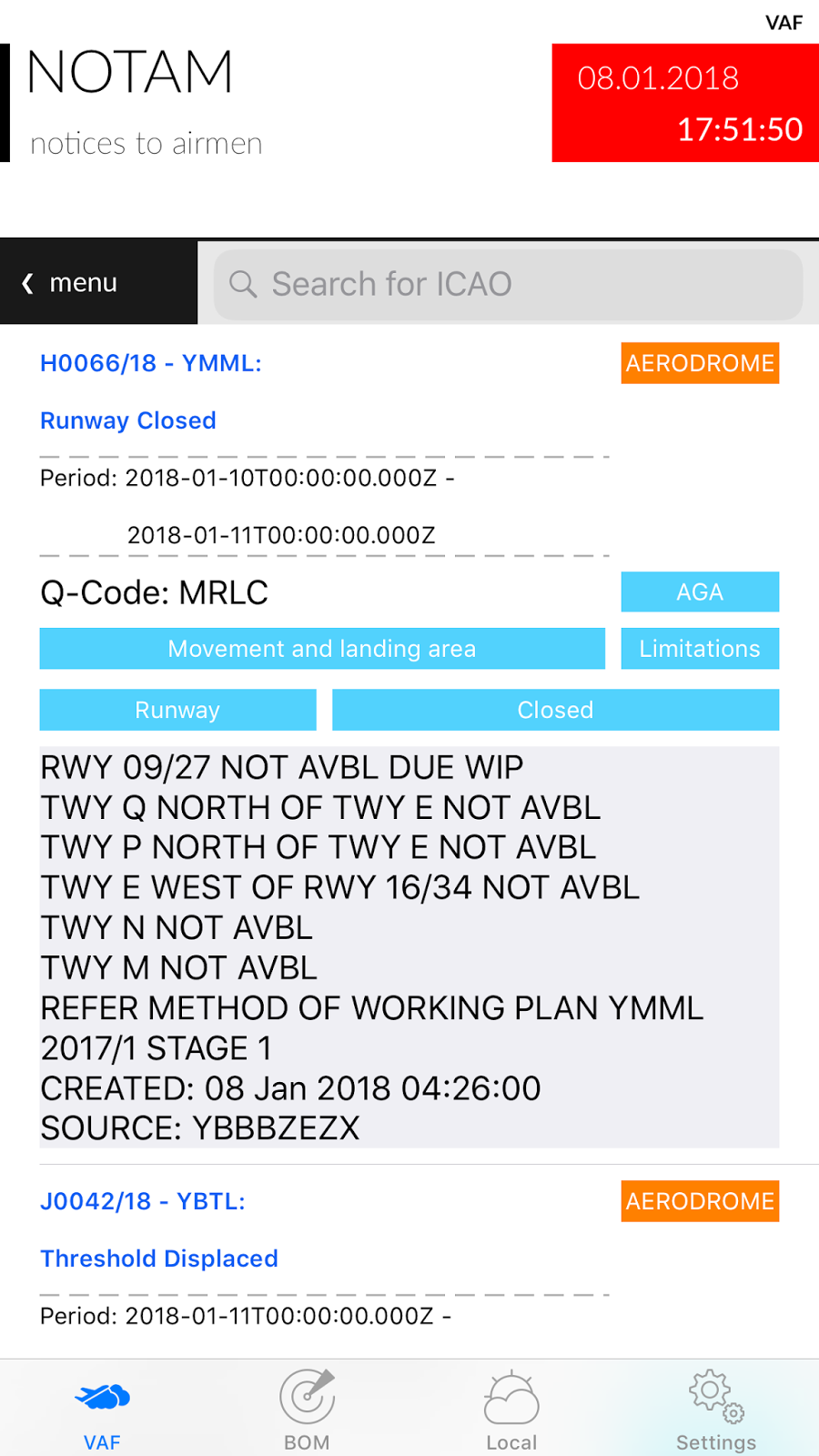
e) NOTAM – from the International Civil Aviation Organization (ICAO). NOTAMs are sorted by creation date. You can search for an airport using its ICAO code (e.g. YSSY for Sydney/Mascot Airport).


f) SIGWX – Significant Weather from the BOM. You can use two fingers to zoom in and out on this screen.

The BOM tab provides more generalised weather information, including:

a) Rain Radar – downloads an animation of recent rain radar information. Select the map of Australia in the menu bar to zoom in on a specific state.

b) Satellite Images – from the Himawari-8 weather satellite. Includes satellite notes from the BOM.

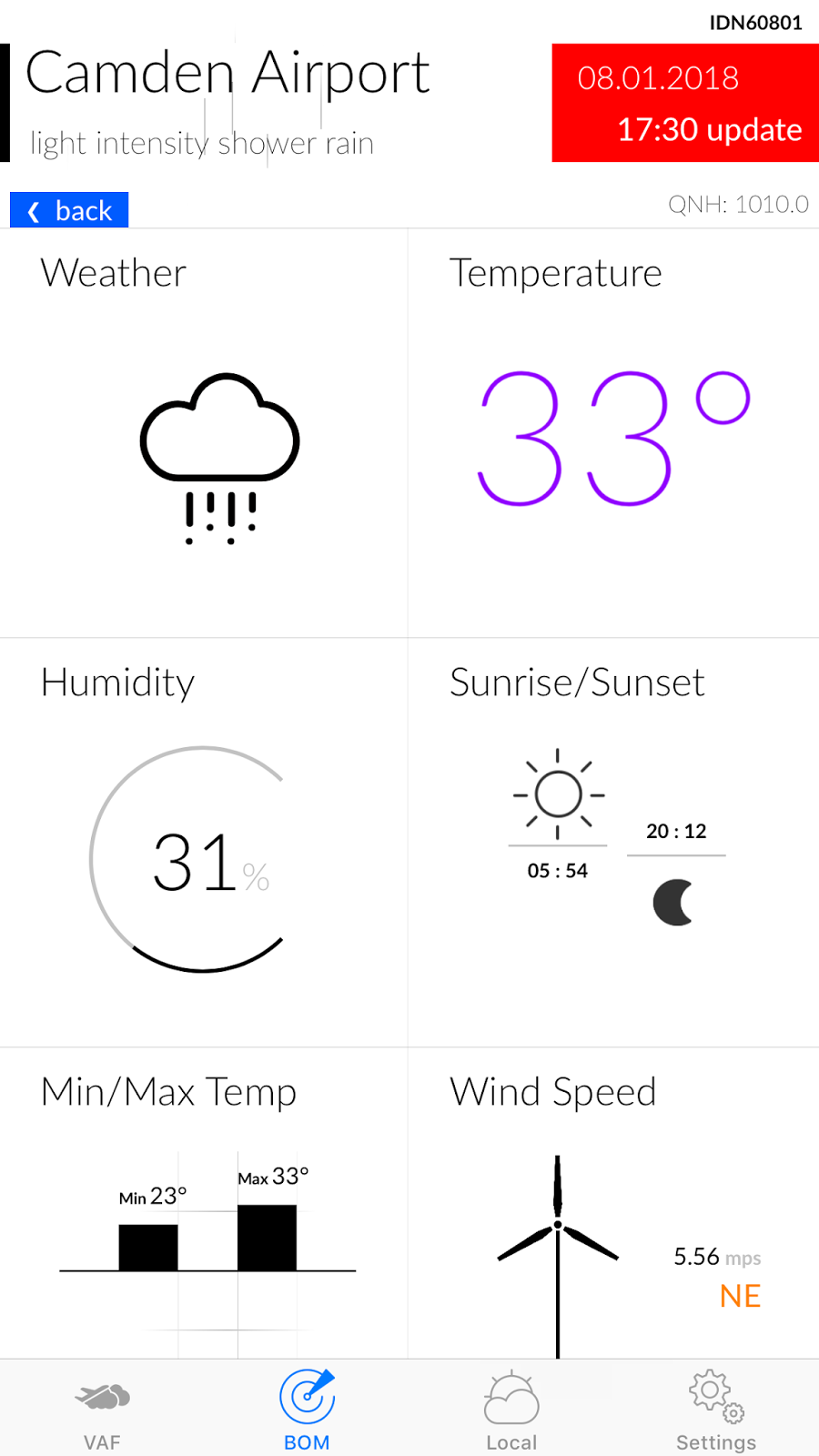
c) Observations – will provide an animated graphical display of the latest weather measurements from a list of 133 locations in Australia. Data shown includes weather, temperature, relative humidity, sunrise/sunset times, minimum and maximum temperatures and wind speed and direction. Drag the table up to show the forecast for that location and drag down to refresh the current data.


The Local tab provides information similar to Observations but for where ever you are at that moment. The first time you tap the Local Tab it will ask your permission to access location services. You need to accept this otherwise the app doesn’t know where you are and can not display the local weather.

The Settings tab allows you to select:

– whether UTC (Zulu) time is displayed on certain screens along with the local time.
– the METAR data source (BOM or NOAA).
– wind speed units (mps, kph or knots).
– displayed temperature units (°C or °F)

The Feedback button allows direct support from the Developer. Please use this for any bug reports or feature requests.

Note:   Airservices Australia is the official provider of the Aeronautical Information Service, which includes the delivery of aviation meteorological products. Therefore, all information for the purpose of flight planning should be obtained from Airservices Australia.

Filed Under: App Development, iOS, Marketing

November 8, 2017 by David Such Leave a Comment

Hashtag – iMessage Sticker Pack 16

Simulator Screen Shot - iPad Pro (12.9-inch) (2nd generation) - 2017-10-29 at 17.37.20

A premium set of Hashtags and symbols.

There are 60 fantastic stickers, including:

#love
#yolo
#SHTF
#TGIF
#eyeroll
#facepalm
#selfie
#princess
#Bro
#mate
#sisters
#aus
#nz
#usa
#uk
#BFF
#cute
#hug
#fail
#xoxo
#TBA

…and many more!

Be the master of texting with a sticker which captures exactly what you want to say. Game Over Man!

Filed Under: App Development, iOS, Marketing

October 9, 2017 by David Such Leave a Comment

Aussie – iMessage Sticker Pack 15

A premium set of Aussie culture stickers, Emoticons / Emojis and symbols.

There are over 50 fantastic stickers, 7 of which are animated.

Simulator Screen Shot - iPad Pro (12.9-inch) - 2017-10-08 at 13.58.48

Be the master of texting with a sticker which captures exactly what you want to say. Game Over Man!

You can overlay these over text or photos. Just tap and hold, then drag to where you want the stamp placed. You can also rotate and resize each sticker.

A feature introduced with iOS 10 is the option to send messages with effects, like having the message inflate, appear in a shower of balloons, or be hidden by invisible ink. To access effects, type your message or insert a picture in the text box, then 3D Touch (or tap and hold on older models) the send button instead of just tapping it as usual.

If you haven’t used iMessage sticker packs then there are some traps for new players. To help people overcome these issues, we have written a couple of articles which may assist:

1. I’ve installed my sticker pack but can’t find it! (https://www.reefwing.com.au/?p=356)
2. I bought an iMessage Sticker pack on iTunes and can’t find it on my phone!! (https://www.reefwing.com.au/?p=323)

Filed Under: App Development, iOS, Marketing

January 7, 2017 by David Such Leave a Comment

Military Slang – iMessage Sticker Pack 13

simulator-screen-shot-2-jan-2017-6-03-00-pm simulator-screen-shot-2-jan-2017-6-04-35-pm


A premium set of Military Slang sticker Emoticons / Emojis and symbols.

If you love the military then what better way to express your emotions than to use these great military themed emoticons? Sierra Hotel!

There are over 90 fantastic stickers, including terms like:

– Code Red
– This Means War!
– Oscar Mike (On the Move)
– Charlie Foxtrot
– Danger
– Toxic
– This Way Towards Enemy
– 411 (Briefing)
– Alpha Mike Foxtrot
– Bingo Fuel
– FNG
– Blue on Blue
– BOHICA (Bend Over Here It Comes Again)
– Charlie Mike (Continue Mission)
– Check Six
– Stay Frosty
– FUBAR
– Helmet Fire
– Lima Charlie (Loud and Clear)
– Light em up!
– Bring the noise.
– Pop Smoke
– RTB (Return to Base)
– Sierra Hotel
– Whiskey Tango Foxtrot

Be the master of texting with a sticker which captures exactly what you want to say. Boom!

Filed Under: App Development, iOS, Marketing Tagged With: iPhone, military, slang, stickers

January 5, 2017 by David Such Leave a Comment

Animated Bugs – iMessage Sticker Pack 12

https://www.reefwing.com.au/wp-content/uploads/2017/01/Animated-Bugs-App-Preview-Profile.mp4

A premium set of Animated Bug sticker Emoticons / Emojis.

If you love bugs then what better way to express your emotions than to use these creepy animated insect emoticons?

Do you have difficulty communicating your feelings? The bugs are here to help. There are 39 fantastic stickers, including 28 animated ones.

The pack has ants, flies, spiders, scorpions, bees, wasps and cockroaches. All crawling across your screen.

Be the master of texting with a sticker which captures exactly what you want to say. Boom!

You can overlay these over text or photos. Just tap and hold, then drag to where you want the stamp placed. You can also rotate and resize each sticker.

Another new feature of iOS 10 is the option to send messages with effects, like having the message inflate, appear in a shower of balloons, or be hidden by invisible ink. To access effects, type your message or insert a picture in the text box, then 3D Touch (or tap and hold on older models) the send button instead of just tapping it as usual.

If you haven’t used iMessage sticker packs then there are some traps for new players. To help people overcome these issues, we have written a couple of articles which may assist:

1. I’ve installed my sticker pack but can’t find it! (https://www.reefwing.com.au/?p=356)
2. I bought an iMessage Sticker pack on iTunes and can’t find it on my phone!! (https://www.reefwing.com.au/?p=323)

!! Follow us on Twitter.
https://twitter.com/reefwing

‼ Like us on Facebook.
https://www.facebook.com/ReefwingSoftware

Filed Under: App Development, iOS, Marketing

December 22, 2016 by David Such Leave a Comment

Street Art – iMessage Sticker Pack 11

https://www.reefwing.com.au/wp-content/uploads/2016/12/StreetArtTitle.mp4


The perfect gift for Christmas! Well maybe not, but you can get your graffiti on and have a cool yule by downloading the latest iPhone sticker pack from Reefwing Software.

I even produced a video of the stickers using After Effects which was rejected by Apple.

This sticker set comes with over 100 stickers! It includes 45 tags, 15 backgrounds, Alphabet (A-Z) and 14 paint splatters. Build up your own designs or use the ones provided.

Be the master of texting with a Street Art sticker which captures exactly what you want to say. Boom! You can overlay these over text, photos or other stickers. Just tap and hold, then drag to where you want the stamp placed. You can also rotate and resize each sticker.

Download it now from iTunes. Click on the link or search for Reefwing in the iMessage store.

Filed Under: iOS, Marketing

  • Page 1
  • Page 2
  • Page 3
  • Go to Next Page »

Primary Sidebar

Email Newsletter

Sign up to the Reefwing Software mailing list to hear about new app releases and other company updates. We won't share your details with others.

Recent Posts

  • Creating Minesweeper using BeeWare, Python, and Pygame April 9, 2024
  • Adding a User Interface to ChatGPT with BeeWare — Part 4 April 7, 2024
  • Version 0.0.2 of Copy Editor Released March 30, 2024
  • New FREE Copy Editor App for macOS March 16, 2024
  • The “Hard Problem” of Consciousness February 1, 2024

Featured Posts

Creating Minesweeper using BeeWare, Python, and Pygame

April 9, 2024 By David Such Leave a Comment

How to create a cross-platform clone of the 90’s classic game Minesweeper, using the briefcase/pygame/python tech stack. #beeware #pygame #python #minesweeper https://reefwing.medium.com/creating-minesweeper-using-beeware-python-and-pygame-e8dae29cf02d

Archives

  • April 2024
  • March 2024
  • February 2024
  • January 2024
  • November 2023
  • October 2023
  • July 2023
  • June 2023
  • May 2023
  • April 2023
  • March 2023
  • November 2022
  • September 2022
  • August 2022
  • July 2022
  • April 2022
  • March 2022
  • February 2022
  • January 2022
  • October 2021
  • August 2021
  • July 2021
  • June 2021
  • February 2021
  • November 2020
  • October 2020
  • May 2020
  • April 2020
  • January 2020
  • November 2019
  • October 2019
  • September 2019
  • July 2019
  • June 2019
  • May 2019
  • March 2019
  • January 2019
  • December 2018
  • October 2018
  • September 2018
  • August 2018
  • July 2018
  • June 2018
  • May 2018
  • March 2018
  • January 2018
  • December 2017
  • November 2017
  • October 2017
  • September 2017
  • August 2017
  • July 2017
  • June 2017
  • April 2017
  • February 2017
  • January 2017
  • December 2016
  • November 2016
  • October 2016
  • September 2016
  • July 2016
  • May 2014
  • April 2014

Search

Copyright © 2025 · Executive Pro on Genesis Framework · WordPress · Log in