• Skip to main content
  • Skip to primary sidebar

Reefwing Software

  • Home
  • Book
  • Development
  • Blog
  • Contact Us
  • Privacy
You are here: Home / Archives for development

development

May 11, 2014 by David Such 1 Comment

Development Complexity & Price

Difficulty

It is difficult to calculate how difficult an app will be to build, but it can be useful to know this when developing a quote for an app. There are a few different approaches that you can take.

You could use Halstead complexity measures which are software metrics introduced by Maurice Howard Halstead in 1977 as part of his treatise on establishing an empirical science of software development. Halstead made the observation that metrics of the software should reflect the implementation or expression of algorithms in different languages, but be independent of their execution on a specific platform. These metrics are therefore computed statically from the code using the following:

For a given problem, Let:

  • \,\eta_1 = the number of distinct operators
  • \,\eta_2 = the number of distinct operands
  • \,N_1 = the total number of operators
  • \,N_2 = the total number of operands
From these numbers, several measures can be calculated:

  • Program vocabulary:

\eta = \eta_1 + \eta_2 \,

  • Program length:

N = N_1 + N_2 \,

  • Calculated program length:

\hat{N} = \eta_1 \log_2 \eta_1 + \eta_2 \log_2 \eta_2

  • Volume:

V = N \times \log_2 \eta

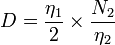
  • Difficulty :

D = { \eta_1 \over 2  } \times { N_2 \over \eta_2 }

  • Effort:

E =  D \times V

The big problem with this approach is that you can’t calculate the metrics until you have written the code. This is problematic at the quotation stage of a project.

Our approach is based more on heuristics (i.e. educated guessing). By completing the following quick questionnaire we can come up with a score out of 100 which approximates the complexity and hence development effort required. This is used as an input into calculating the number of hours required and ultimately the cost.

Reefwing Complexity Matrix

  1. How customised is the user interface? Score from 0 for using the provided UI elements to 20 for a totally customised UI. Most game apps score a 20 for this, as everything from the buttons to the navigation bars need to be customised to suit the game theme. Utility apps are more likely to get a low score.
  2. How complicated is the underlying data model? This could vary from 0 for no persistent data to 20 for server based data. Using SQL or Core Data (for iOS) would be somewhere in the middle.
  3. How complex is the app? This relates to the app objective and may influence the other considerations. For example, an app with low complexity may simply display data. The other extreme would be an app that performs route mapping or language recognition. This dimension is a measure of what you are trying to do, the previous question on the data model is an element of how you are solving the problem. A lot of games can be surprisingly complex, an example of this would be if you were trying to build a decent AI for a 3D environment. Complexity will also influence how much code you will need to write which in itself will make life more difficult (have a look at the Halstead equations above).
  4. Who, what or how does the app have to communicate? You would score a 0 for this if the app was stand alone. The score would rise with the scale and type of networking required. You would also take into account how the networking was performed (e.g. Bluetooth, Wi Fi, etc) and how robust it needed to be (redundancy?).
  5. Does the app require 3rd party libraries or API’s? This could be ad servers, geo location, language recognition, translation services or anything similar. Score 0 for none and increase the score based on the number of interfaces. We also vary the score based on the maturity of the API and the API provider.

Once you have calculated your complexity score by adding the results from the five questions above you will get a number out of 100. We segment our apps into the following categories:

  • > 80: Insane:: You probably need to double the price you first thought of. Complexity increases exponentially (not linearly) with added elements because they all interact with each other.
  • 60 – 80: Difficult:: In this range you would double check everything and ensure that you have a tight specification. This app will likely take you longer than you expect and throw up things that you don’t expect. Add an extra 25 – 50% contingency.
  • 40 – 60: Average:: Most apps will fall into this range, no extra contingency should be required as long as the specification is solid and you have wire frames.
  • 20 – 40: Easy:: Should be a walk in the park. A good place for beginner developers to start.
  • 0 – 10: Simple:: There can never be too many fart apps.

We haven’t seen any other attempts to model app complexity but we would love to hear about the practices or thoughts of other developers.

Filed Under: App Development, Title Post Tagged With: app, calculating, degree, development, difficulty, estimate, quote, quoting

May 7, 2014 by David Such Leave a Comment

Android Studio for App Development

Androidgears

At Google I/O 2013, Google launched a new Integrated Development Environment (IDE) based on IntelliJ IDEA, called Android Studio.

Android Studio provides integrated Android developer tools for development and debugging. On top of the capabilities you expect from IntelliJ, Android Studio offers:

  • Gradle-based build support.
  • Android-specific refactoring and quick fixes.
  • Lint tools to catch performance, usability, version compatibility and other problems.
  • ProGuard and app-signing capabilities.
  • Template-based wizards to create common Android designs and components.
  • A rich layout editor that allows you to drag-and-drop UI components, preview layouts on multiple screen configurations, and much more.
  • Built-in support for Google Cloud Platform, making it easy to integrate Google Cloud Messaging and App Engine as server-side components.

Android Studio includes a powerful code editor, which supports smart editing, advanced code refactoring, and deep static code analysis.

Smart editing includes inline resource lookups that make it easier to read your code. Code refactoring allows you to transform your code across the scope of the entire project.

Static code analysis helps you identify bugs quickly. On top of the hundreds of code inspections that IntelliJ IDEA provides, Google have added custom inspections. For example,  metadata to the Android APIs, that flag which methods can return null and which can’t, which constants are allowed for which methods, and so on. Android Studio uses that data to analyze your code and find potential errors.

Be aware that Android Studio is currently available as an early access preview. Several features are either incomplete or not yet implemented and you may encounter bugs. If you are not comfortable using an unfinished product, you may want to instead download (or continue to use) the ADT Bundle (Eclipse with the ADT Plugin).

Instructions for downloading the latest version of Android Studio are available here: http://developer.android.com/sdk/installing/studio.html. Versions are available for download on Windows, Mac OS X and Linux.

Filed Under: Android, App Development Tagged With: android, app, development

May 6, 2014 by David Such Leave a Comment

How much money will my app make?

For many people the whole point of writing applications is to see them published in the App store and available for download from iTunes. Before you quit your job and go out and buy matching Porsche 911’s you would be wise to get a few months of sales data under your belt. Like most endeavours, there is a bell curve of app sales. Everyone hears about Angry Birds developers making $70m, but there is a lot less media coverage at the other end of the bell curve.

In a recent survey of more than 1,500 developers in 83 countries, it was found that the average per-app revenue is roughly $1,200 to $3,900 depending on the platform. Additionally, the survey noted that an app has roughly a 35% chance of generating between $1 to $500. This obviously means that most developers cannot rely on app development as their main source of income. However, it does mean that if you put the effort in you can make enough to fund your development habit.

Our own experience is that you can never tell which Apps are going to be regular sellers (LifeGoals) and which will sink like a stone (LifeMovie). The Reefwing stable of Apps currently nets us around AUD$10k per annum, which is sufficient to purchase a MacBook Air, a new iPad, external development costs (Apple Developers Licence, App Sales Analytics, web-site and forum costs, etc.) plus a bit of change for the highly caffeinated beverages which programmers run on. Working mainly on on our contracted 3rd party apps we only work on these on the odd night and weekend so with more application we imagine the rewards would be better. The thing that we are no where near recovering is the time spent developing. The average App takes us about 3 months from start to finish and while the proceeds roll in for some years to come, it isn’t really passive income because sales quickly decline if you aren’t frequently updating your app.

However, lets face it – we would code if we didn’t get paid anything so anything we do get is a very pleasant upside. There is also something addictive about tracking the daily “sales” of you app (even if it is free).

The other thing that most developers don’t realise, is that the apps which are successful in the App store, have as much time and money spent on marketing their Apps as they do on developing them. There is the odd exception but these are an exception. Books have been written on this subject and we will provide our thoughts on the best approaches to marketing in another blog post.

Filed Under: App Development, Marketing Tagged With: app, development, marketing, profit, sales

April 28, 2014 by David Such Leave a Comment

The Care & Feeding of Your Developer

PastedGraphic-1

You have decided that your business needs an app, so what is the best way to ensure that you get what you want?

Well you could follow the App Happening four step framework:

  • Concept, Marketing & Viability
  • Design & Specs
  • Build & Approve
  • Launch & Support

This is a best in class solution for getting the app you want, at the lowest cost, in the shortest possible time. App Happening provides free marketing tips, app concept templates, strategy guides, development timelines and even an eBook on creating a successful app (http://www.apphappening.com/ah/appbuildingguides). So why does (almost) nobody use these? I suspect the reason is a combination of, “too hard”, “why bother” and “I just want to get started”!

As a Developer, I’m not too worried about whether your app is going to sell well or deliver on your business case. My job is to deliver the app you specified at the cost I bid and within the agreed time frame. If you have reached the stage of hiring a Developer, I assume that you have already worked out that the cost and effort is worthwhile. If not, then I suggest that you go and have a look at the Concept, Marketing & Viability section (http://www.apphappening.com/ah/conceptmarketingviability) of the web site.

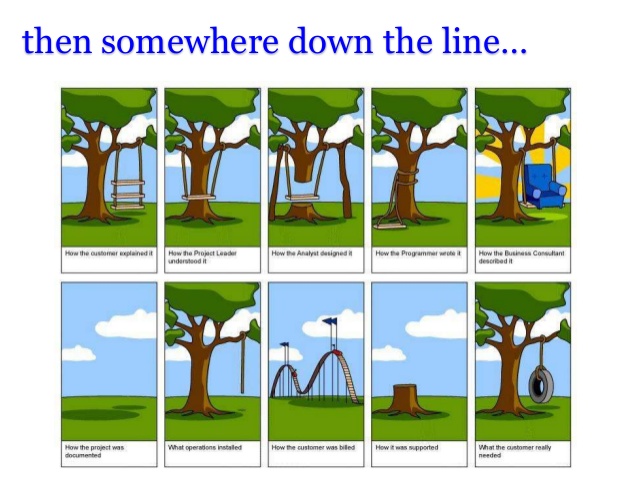
I’m also assuming that you have a clear idea of what your app will do, because if you don’t, explaining the concept to me will be difficult. I don’t need a complete Functional Description and fully laid out screen shots initially but I need enough to be able to provide you a price and how long the development process will take. Before going into the bare minimum specification requirements, I would like to discuss why the specification step is important.

How to spend a lot of Money and NOT get what you want!

PastedGraphic-2

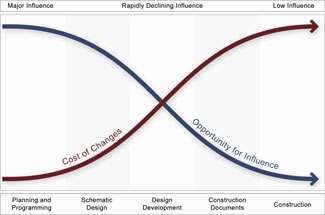
If you have ever renovated a house you will know that the cheapest time to modify the design is before construction start. It is exactly the same for app development. You want to have a very good idea of the outcome before you start. Sooner or later you will need to make decisions about what the app will do and what it will look like. Given this fact, doesn’t it make sense to do it at the beginning? I guarantee that if you do, it will save you money and reduce frustration.

There are generally two ways that you can engage a Developer:

1. Fixed price; or
2. Hourly rate.

If you choose to go the hourly rate route then you could just make it up as you go along (some people call this AGILE development) but it can become expensive. If you select the fixed price approach, it is much more important that you get the definition phase correct. Do not assume that a feature that you want is included in the design, if it hasn’t been explicitly specified then your developer hasn’t costed it and it is unlikely to end up in the final product. Assumptions in the design phase of fixed price contracts lead to disputes, which waste everyones time and energy.

design

I have enough stress in my life…

If the specification of your app consists of something like “i need a game built in 1 week for a fixed price of $100”, don’t be surprised if no developers bid on it (what game? what platform? what device? what???). The level of design specification required depends on where you are in the development cycle. If you just want indicative pricing to plug into your business model then simple dot points which describe the objective, functionality and target platform (e.g. iOS or Android) are probably sufficient – just be up front with the Developer.

If you are committed to building an app then I’m afraid that I’m going to direct you back to the App Happening website page (http://www.apphappening.com/ah/designspec) on Design and Specification. It is in your interests to specify the app as fully as possible. You should include the Developer in this process if possible. Start with your simple dot point functional specification. Your Developer can tell you what is technically possible on a particular platform and what is possible but difficult (i.e. expensive). Once you have a good idea of app functionality, sketch up some indicative screen shots (wire frames), pen and paper is fine. Alternately get the Developer to suggest something. You want these wire frames to be low fidelity so that people are comfortable playing around with the design and changing them. The combination of the Functional Spec and the Wireframes will give you a flow diagram or flow map which describes how users will move around your app. Make sure that key functional screens are at the top of your navigation stack.

If your Functional Spec is detailed enough, the data base design (if required) will fall out of this. For a people based app, you may want to save information like name, address, phone, favourite colour, etc. Consider whether you think the data model will change in the future, if the ability to update and migrate data models isn’t built into the original design it can be expensive to retrofit it.

If you follow the above suggestions, your Developer will be in the best possible position to assure you get what you want, when you want it.

Filed Under: App Development, Title Post Tagged With: app, development

  • « Go to Previous Page
  • Page 1
  • Page 2

Primary Sidebar

Email Newsletter

Sign up to the Reefwing Software mailing list to hear about new app releases and other company updates. We won't share your details with others.

Recent Posts

  • Pi and the Mirage of Patternicity April 5, 2026
  • Claude Code: Creating a C++ Linter for Embedded Development April 4, 2026
  • The Missing Clock: Why Intelligence Needs Time March 29, 2026
  • Will Robots Evolve into Crabs? March 27, 2026
  • Learning to Claude Code March 16, 2026

Featured Posts

Pi and the Mirage of Patternicity

April 5, 2026 By David Such Leave a Comment

In April 2025, a claim began circulating online: pi is gradually increasing around the 7,237th decimal place. A math enthusiast in Cincinnati named April Simons had apparently flagged the anomaly. Prof F.O. Olsday, head of the Number Theory Group at Princeton, was quoted confirming it. Cosmologists were linking it to the accelerating expansion of the […]

Archives

  • April 2026
  • March 2026
  • April 2024
  • March 2024
  • February 2024
  • January 2024
  • November 2023
  • October 2023
  • July 2023
  • June 2023
  • May 2023
  • April 2023
  • March 2023
  • November 2022
  • September 2022
  • August 2022
  • July 2022
  • April 2022
  • March 2022
  • February 2022
  • January 2022
  • October 2021
  • August 2021
  • July 2021
  • June 2021
  • February 2021
  • November 2020
  • October 2020
  • May 2020
  • April 2020
  • January 2020
  • November 2019
  • October 2019
  • September 2019
  • July 2019
  • June 2019
  • May 2019
  • March 2019
  • January 2019
  • December 2018
  • October 2018
  • September 2018
  • August 2018
  • July 2018
  • June 2018
  • May 2018
  • March 2018
  • January 2018
  • December 2017
  • November 2017
  • October 2017
  • September 2017
  • August 2017
  • July 2017
  • June 2017
  • April 2017
  • February 2017
  • January 2017
  • December 2016
  • November 2016
  • October 2016
  • September 2016
  • July 2016
  • May 2014
  • April 2014

Search

Copyright © 2026 · Executive Pro on Genesis Framework · WordPress · Log in