• Skip to main content
  • Skip to primary sidebar

Reefwing Software

  • Home
  • Copy Editor
  • iOS Apps
  • Blog
  • Contact Us
  • Privacy
You are here: Home / Archives for iOS

iOS

December 7, 2016 by David Such Leave a Comment

Sheep – iMessage Sticker Pack 10

A premium set of Sheep sticker Emoticons / Emojis for your iPhone or iPad. You can download them from iTunes.

If you love sheep then what better way to express your emotions than to use these cute sheep emoticons?

Do you have difficulty communicating your feelings. The sheep are here to help. There are over 60 fantastic stickers, including 10 animated ones.

The pack has Christmas, Holiday, New Years, St Patricks Day and Valentine Day themed sheep.

Be the master of texting with a sticker which captures exactly what you want to say. Boom!

You can overlay these over text or photos. Just tap and hold, then drag to where you want the stamp placed. You can also rotate and resize each sticker.

Another new feature of iOS 10 is the option to send messages with effects, like having the message inflate, appear in a shower of balloons, or be hidden by invisible ink. To access effects, type your message or insert a picture in the text box, then 3D Touch (or tap and hold on older models) the send button instead of just tapping it as usual.

simulator-screen-shot-3-dec-2016-8-02-52-pm simulator-screen-shot-3-dec-2016-8-03-16-pm

If you haven’t used iMessage sticker packs then there are some traps for new players. To help people overcome these issues, we have written a couple of articles which may assist:

1. I’ve installed my sticker pack but can’t find it!
2. I bought an iMessage Sticker pack on iTunes and can’t find it on my phone!!

!! Follow us on Twitter.
https://twitter.com/reefwing

‼ Like us on Facebook.
https://www.facebook.com/ReefwingSoftware

A sample of one of the animated stickers: sheepexplosion

Filed Under: iOS, Marketing

December 7, 2016 by David Such Leave a Comment

Pandi – iMessage Sticker Pack 9

A premium set of sticker Panda Emoticons / Emojis for your iPhone or iPad. Download them now from iTunes.

If you love Pandas then what better way to express your emotions than to use Panda emoticons?

Do you have difficulty communicating your feelings. Pandi is here to help. There are 31 fantastic stickers.

Includes Christmas, Holiday and Valentine Day themed Pandas.

Be the master of texting with a sticker which captures exactly what you want to say. Boom!

You can overlay these over text or photos. Just tap and hold, then drag to where you want the stamp placed. You can also rotate and resize each sticker.

Another new feature of iOS 10 is the option to send messages with effects, like having the message inflate, appear in a shower of balloons, or be hidden by invisible ink. To access effects, type your message or insert a picture in the text box, then 3D Touch (or tap and hold on older models) the send button instead of just tapping it as usual.


simulator-screen-shot-19-nov-2016-5-45-01-pm

Filed Under: App Development, iOS

December 7, 2016 by David Such Leave a Comment

Rubber Stamp – iMessage Sticker Pack 8

The MEGA pack of colourful ink stamp stickers. Over 65 fantastic stamps to cover every situation. You can download them from iTunes.

Be the master of texting with a stamp which captures exactly what you want to say. Boom!

You can overlay these over text or photos. Just tap and hold, then drag to where you want the stamp placed. You can also rotate and resize each sticker.

Another new feature of iOS 10 is the option to send messages with effects, like having the message inflate, appear in a shower of balloons, or be hidden by invisible ink. To access effects, type your message or insert a picture in the text box, then 3D Touch (or tap and hold on older models) the send button instead of just tapping it as usual.

simulator-screen-shot-18-nov-2016-3-09-55-pm simulator-screen-shot-18-nov-2016-3-10-11-pm simulator-screen-shot-18-nov-2016-3-24-31-pm

If you haven’t used iMessage sticker packs then there are a couple of traps for new players. To help people overcome these issues, we have written a couple of articles which may assist:

1. I’ve installed my sticker pack but can’t find it!
2. I bought an iMessage Sticker pack on iTunes and can’t find it on my phone!!

Check out https://www.reefwing.com.au/ for more information.

!! Follow us on Twitter.
https://twitter.com/reefwing

‼ Like us on Facebook.
https://www.facebook.com/ReefwingSoftware

Filed Under: iOS, Marketing

December 7, 2016 by David Such Leave a Comment

Kiti – iMessage Sticker Pack 7

A premium set of sticker Cat Emoticons / Emojis.

If you love cats then what better way to express your emotions than to use cat emoticons?

Do you have difficulty communicating your feelings. Kiti is here to help. There are 31 fantastic stickers.

Includes Christmas, New Years and Valentine Day themed cats.

If you haven’t used iMessage sticker packs then there are a couple of traps for new players. To help people overcome these issues, we have written a couple of articles which may assist:

1. I’ve installed my sticker pack but can’t find it! (https://www.reefwing.com.au/?p=356)
2. I bought an iMessage Sticker pack on iTunes and can’t find it on my phone!! (https://www.reefwing.com.au/?p=323)


simulator-screen-shot-17-nov-2016-6-08-43-pm


The pack of 31 stickers covers things like:

ø Saying Hi (or meow)
ø Wink
ø Merry Christmas
ø OMG
ø Purrrrfect
ø Talk to me
ø Really?
ø Happy and Unhappy
ø I love you
ø No words!
ø Please
ø I have an idea
ø Party time!
ø I’ll find you!
ø Ta Dah!
ø Need a hug
ø Have a cool Yule!
ø No!!!
ø Princess
ø I am cute
ø I love fashion
ø Kitty Girl
ø It’s meow or never!
ø Happy meow Year! *sorry*
ø Morning Beautiful
ø We need to talk…
ø My little Kitty
ø At least I have my dignity

Filed Under: iOS, Marketing

December 7, 2016 by David Such Leave a Comment

Robots – iMessage Sticker Pack 6

39 FREE Robot stickers for your iPhone or iPad – boom! Download now from iTunes.

Everyone should have more robots in their life. So here you go!!!

Did we mention that they were FREE! Limited time only. Get yours before they start costing money!

If you like these, please check out the other great sticker packs from Reefwing Software.


simulator-screen-shot-16-nov-2016-4-44-41-pm

Filed Under: iOS, Marketing

November 15, 2016 by David Such Leave a Comment

Bananas – iMessage Sticker Pack 5

simulator-screen-shot-14-nov-2016-11-23-13-am

Banana Emoticons / Emojis – now ANIMATED!!!

If you love bananas then what better way to express your emotions than to use banana emoticons?

Do you have difficulty communicating your feelings. Bananas is here to help. There are 31 fantastic stickers plus 10 mesmerising ANIMATED bananas!! Check out the video to see the Bananas in action.

Includes Christmas, New Years and Valentine Day themed bananas.

If you haven’t used iMessage sticker packs then there are a couple of traps for new players. To help people overcome these issues, we have written a couple of articles which may assist:

1. I’ve installed my sticker pack but can’t find it!
2. I bought an iMessage Sticker pack on iTunes and can’t find it on my phone!!

For those interested, the banana animations were done using two methods:

1. Hand draw each frame – this takes a LONG time! It is also pretty tedious.
2. Create a puppet in Photoshop, import this into the new Adobe Character Animator and then export the puppet animation back into Photoshop for optimisation and to create the GIF. Each animated GIF sticker can only be a maximum of 500kB which really limits what you can do.

The pack of 41 stickers covers things like:

ø Saying Hi
ø Wink
ø Merry Christmas
ø OMG
ø “Wax on, wax off”
ø Thumbs up!
ø Crying
ø Happy and Unhappy
ø A bit too much alcohol…
ø I love you
ø No words!
ø Time to cowboy up!
ø Circle of trust – you aren’t in it…
ø Party time!
ø Fireworks
ø Very Nice!
ø Don’t touch this…

You can download Bananas from iTunes.

Filed Under: App Development, iOS, Marketing

November 2, 2016 by David Such Leave a Comment

Dogi – iMessage Sticker Pack 4

Dog Emoticons / Emojis – that’s it!

If you love dogs then what better way to express your emotions than to use dog emoticons?

Do you have difficulty communicating your feelings. Dogi is here to help.

simulator-screen-shot-30-oct-2016-3-52-33-pm

The pack of 45 stickers covers things like:

  • ø I love you (or possibly I love your shoes);
  • ø Let’s go play!
  • ø Feel like a swim?
  • ø I’m not happy Jan.
  • ø Dance time?
  • ø Let’s sneak out.
  • ø Drink? Too much drink?
  • ø Help!!!
  • ø I don’t feel so good…
  • ø Stick ’em up!
  • ø Bath?
  • ø You electrify me!
  • ø Happy!
  • ø Pouting.
  • ø I fart in your general direction.
  • ø You look at things differently.
  • ø I’m gonna run to you.
  • ø Nap time.
  • ø Joe Cool.
  • ø You’re number 1!
  • ø Ground Control to Major Tom…
  • ø Hungry?
  • ø Woops.
  • ø You embarrassed me!
  • ø Cold?!
  • ø Rudolph
  • ø Your turn to cook.
  • ø Halloween Dog
  • ø Whistle while you…
  • ø This is what I think of your idea.

Filed Under: App Development, iOS, Marketing Tagged With: dog, emoticons, iMessage, pack, sticker

October 31, 2016 by David Such 1 Comment

I’ve installed my sticker pack but can’t find it!

1. The Problem

Apple have really dropped the usability ball with their iMessage sticker packs. We have previously done a blog post to help people install their sticker pack but even if you manage to install it, finding the stickers takes some doing and there are a few tricks you need to be aware of.

2. Where are my Stickers???

If the sticker pack is showing as installed in the purchased section of the app store on your iOS device then you are half way there. See image below. If they are not showing as installed then refer to our earlier blog on how to install them.

img_1373


3. How do I insert a sticker???

There are 2 scenarios, an exisiting text conversation and starting a new one. The process is pretty similar for both. The main difference for a new conversation is that you CAN NOT add a sticker until you have inserted the To: mobile number.

img_1399


4. I still don’t see any stickers!!!

If you can’t see the icon that looks like an A made out of pencils (in the image above), then you need to tap on the “>” icon, next to where you type the text of your SMS. This is shown in the image below.

img_1394


5. STLLL NO STICKERS!!!!!!!!!!!!!!!

Ok we are getting closer. If you tap on the “A” icon (I have no idea what it is supposed to represent – it looks like the Xcode icon), then if you have used stickers before you will see the ones that you have used most recently. See image below.

img_1396


You can swipe left and right from here to see your various sticker packs. If you have never used stickers before, then you may have to tap on the icon in the bottom left which looks like 4 ovals, once again have a look at the image above if this isn’t clear.

Tapping on the “4 ovals” icon will bring up all the sticker packs that you have installed. You can tap on the one that you want to use. See image below. This screen also gives you access to the iMessage app store.

img_1397


6. Phew I have found the stickers – how do I use them?

Well there are 2 ways.

  • You can tap on a sticker which will place it in the text box. From there you can delete it by tapping on the little x icon or send it by tapping the green up arrow icon.
  • You can also tap and drag a sticker anywhere on an exisiting conversation. This is the trick that our Response sticker pack uses to change what people have said. Note that you need to tap and hold until the lift animation occurs – then you can drag the sticker onto the conversation.

img_1398

Filed Under: App Development, iOS, Marketing Tagged With: iMessage, problem, sticker

October 29, 2016 by David Such Leave a Comment

Yet another iMessage Sticker Pack!

Is your life like a comic book? Well with the iMessage Kapow! sticker pack you can talk like you are in the comics.

Cape not included. You can download your pack from iTunes.

The 30 colourful stickers contain zingers like:


simulator-screen-shot-27-oct-2016-5-24-53-pm simulator-screen-shot-27-oct-2016-5-25-05-pm

Filed Under: App Development, iOS, Marketing

October 28, 2016 by David Such Leave a Comment

Installing Test Fairy on your iOS device

1. What is Test Fairy?

Test Fairy is a cloud based beta testing service. We used to use TestFlight but then Apple bought the company and made it for iOS only. Test Fairy allows your users to have a common beta testing experience whether they are using Android or iOS. In addition to providing a deployment tool for your ad hoc builds, Test Fairy provides the developer with useful analytics that help track down issues.

screen-shot-2016-10-28-at-10-32-06-am

2. Invitation to be a Tester

The first step in becoming a beta tester is that you will receive an email which looks like the following image. You need to open this email on the iOS device that you want to use for testing (i.e. your iPhone or iPad). Then tap on the link which says “Please click here to register your mobile device”. This will send the developer a copy of that devices UDID.

The reason that you need to open the email on your iOS device is that in order for a developer to distribute apps outside the app store, they need to include the unique device ID (UDID) of your iPhone or iPad in the build. This prevents developers from selling outside the app store as it is quite a painful process to add a UDID and each developer is only allowed to add 100 devices of each type per year. For iOS apps, we can register 100 iPad, 100 iPhone, and 100 iPod Touch devices. This is in total, it doesn’t matter how many apps you have. Each time you add a device you need to add it in iTunes Connect, update the provisioning profile, import the new provisioning profile into your build, recompile and redistribute.

A UDID looks something like this – 2b6f0cc904d137be2e1730235f5664094b831186.

img_1386


3. Registering your Device

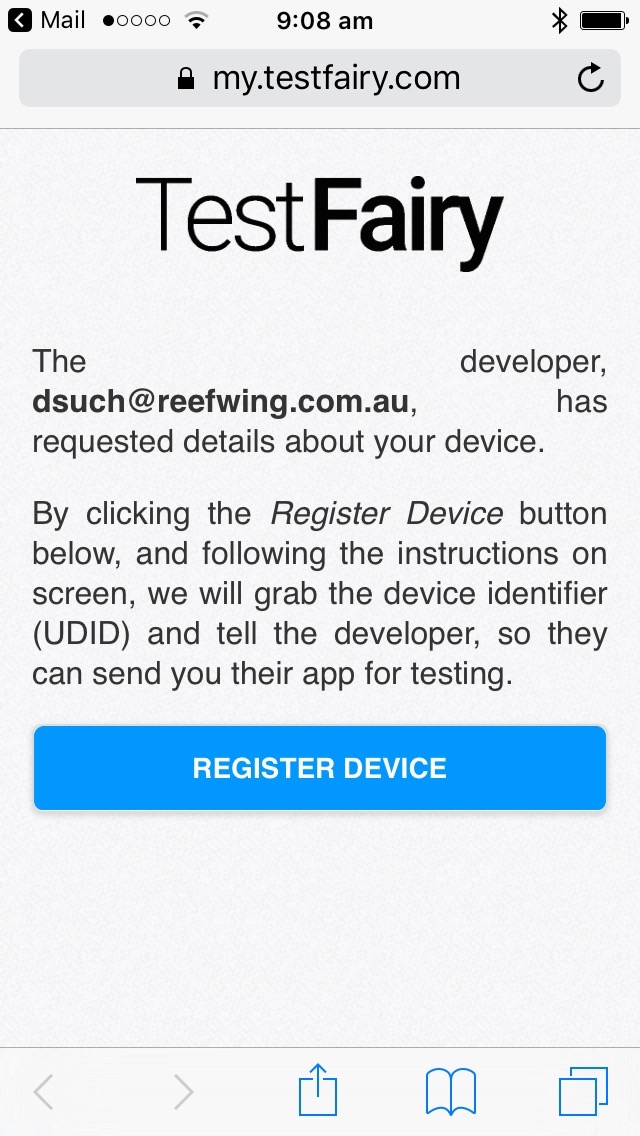
Tapping the link in your email will open the following page in a web browser on your device. Tap on the Register Device button to send your UDID to the developer.


img_1387

4. Install the Test Fairy Device Management Profile

Tapping on Register Device will take you to the device management profile installation screen. Tap Install in the top right corner.

To be able to monitor and limit usage on Apple devices, a device management profile is used. This profile allows the phone to send your UDID to the Test Fairy servers.


img_1388

5. Authorise installation of Profile

Enter the normal unlock code for the device when asked to “Enter Passcode”. This ensures that you have the authority to install the profile.


img_1389


6. Confirm Installation

Tap Install (again!).

img_1390

7. Confirmation Message

All done. Any questions please contact your developer!

img_1391

Filed Under: Android, App Development, iOS, Testing Tagged With: android, Fairy, installation, iOS, Test

  • « Go to Previous Page
  • Page 1
  • Page 2

Primary Sidebar

Email Newsletter

Sign up to the Reefwing Software mailing list to hear about new app releases and other company updates. We won't share your details with others.

Recent Posts

  • Creating Minesweeper using BeeWare, Python, and Pygame April 9, 2024
  • Adding a User Interface to ChatGPT with BeeWare — Part 4 April 7, 2024
  • Version 0.0.2 of Copy Editor Released March 30, 2024
  • New FREE Copy Editor App for macOS March 16, 2024
  • The “Hard Problem” of Consciousness February 1, 2024

Featured Posts

Creating Minesweeper using BeeWare, Python, and Pygame

April 9, 2024 By David Such Leave a Comment

How to create a cross-platform clone of the 90’s classic game Minesweeper, using the briefcase/pygame/python tech stack. #beeware #pygame #python #minesweeper https://reefwing.medium.com/creating-minesweeper-using-beeware-python-and-pygame-e8dae29cf02d

Archives

  • April 2024
  • March 2024
  • February 2024
  • January 2024
  • November 2023
  • October 2023
  • July 2023
  • June 2023
  • May 2023
  • April 2023
  • March 2023
  • November 2022
  • September 2022
  • August 2022
  • July 2022
  • April 2022
  • March 2022
  • February 2022
  • January 2022
  • October 2021
  • August 2021
  • July 2021
  • June 2021
  • February 2021
  • November 2020
  • October 2020
  • May 2020
  • April 2020
  • January 2020
  • November 2019
  • October 2019
  • September 2019
  • July 2019
  • June 2019
  • May 2019
  • March 2019
  • January 2019
  • December 2018
  • October 2018
  • September 2018
  • August 2018
  • July 2018
  • June 2018
  • May 2018
  • March 2018
  • January 2018
  • December 2017
  • November 2017
  • October 2017
  • September 2017
  • August 2017
  • July 2017
  • June 2017
  • April 2017
  • February 2017
  • January 2017
  • December 2016
  • November 2016
  • October 2016
  • September 2016
  • July 2016
  • May 2014
  • April 2014

Search

Copyright © 2025 · Executive Pro on Genesis Framework · WordPress · Log in